Adding details and files
Fill in a few details and attach the document.
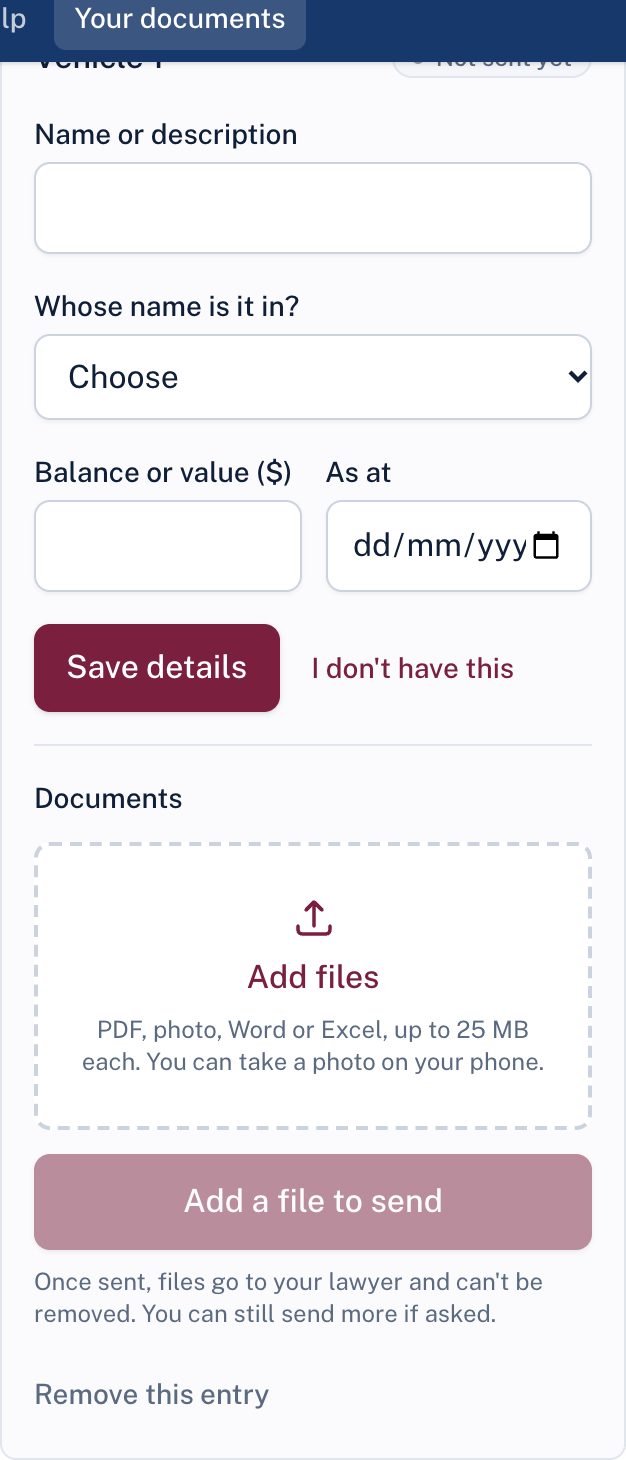
- Under the right card, choose + Add (for example + Add bank account).
- Fill in the details your lawyer asks for, such as the bank's name, the last 4 digits of the account number, the dates the statements cover, whose name the account is in, and the balance. Choose Save details.
- Under Documents, choose Add files and pick your files, or take a photo of a paper document with your phone.
- When everything is attached, choose Send ... to my lawyer.
What you can send
PDF files, photos (including iPhone photos), Word and Excel files, up to 25 MB each. Several files can go on one entry, for example twelve monthly statements.
Tip: Photographing a paper document? Lay it flat in good light and make sure all four corners are in the picture.
Until you send, you can change details, remove files, or remove the entry. Once sent, files go to your lawyer and can't be removed. If something's wrong, tell your lawyer; they can ask you for a new copy.
Still stuck? Contact the law firm that invited you; their details are at the foot of your page.