A client portal for collecting documents, not just storing them
A file-sharing portal gives clients somewhere to put documents. Matter Folio gives them a list of exactly what you need, shows them what's done and what's left, and tells you the status of every item.
What should a client document portal for lawyers do?
It should let clients upload documents securely, but it should also tell them what to upload and show the firm what's missing. Matter Folio's portal pairs secure uploads with an item-by-item request list, reminders and review, and keeps a record of who did what.
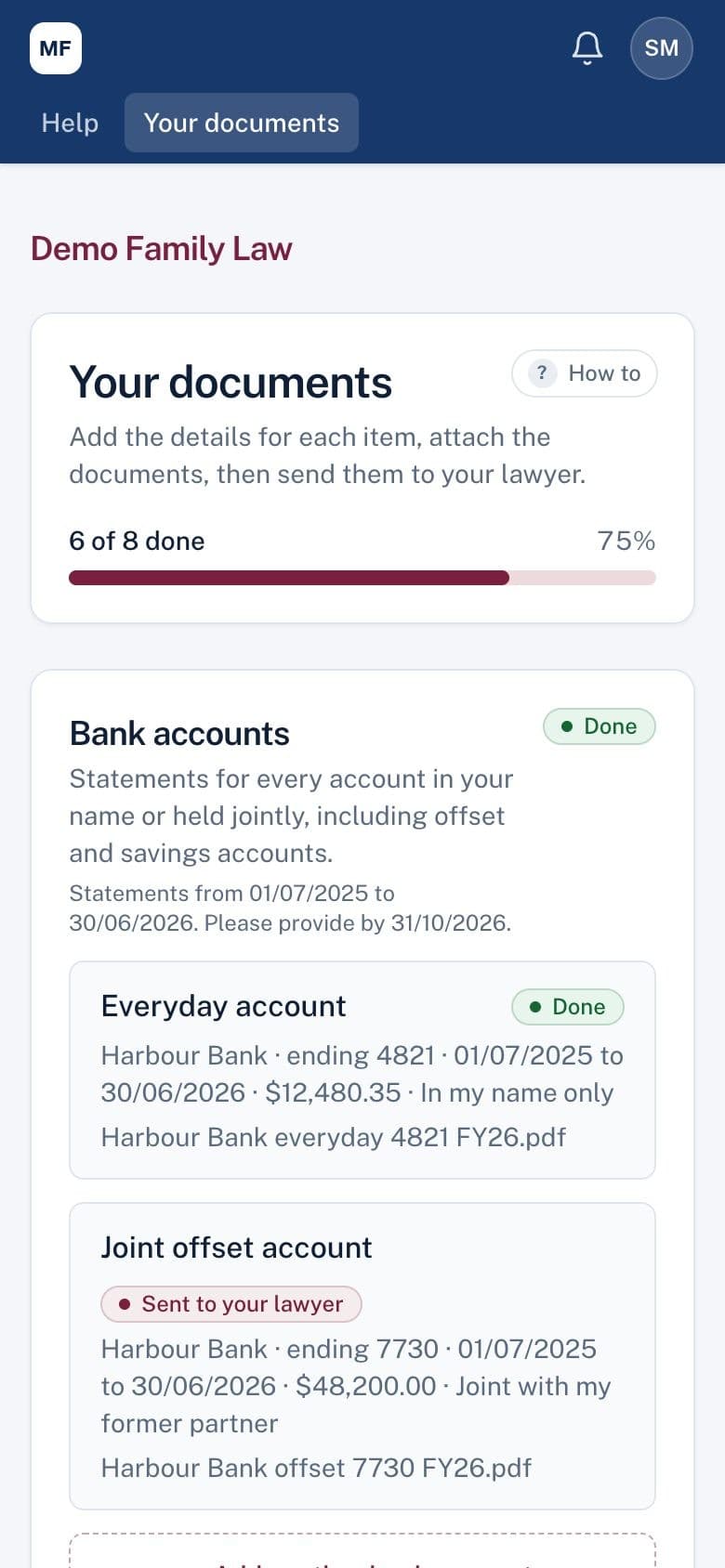
What your client sees
Your firm's logo and colour, a progress count, and a list of the documents you've asked for in plain English. Each item says whether it's done, waiting for your review or needs a new copy, and why. It works in any browser on a phone or computer, with nothing to install.
Security a family law file needs
Separation matters involve some of the most sensitive documents a firm holds. Matter Folio is built on that assumption.
- Everyone, including clients, signs in with a password and a six-digit authenticator code
- Hosted in Australia: the application, database and documents are in Sydney
- Emails never include document names, amounts or details, just a link to sign in
- Access rules are enforced in the database itself and checked by an automated security test suite
- Every view, upload and download is recorded in the matter's activity trail
Privacy controls for family law
If the other party might read your client's email, hold back the invitation and give them the link another way; reminders then appear only in the portal. The other side's lawyer has their own separate page and never sees your client's list, only the documents you choose to disclose.
More than a place to put files
Behind the portal, your team reviews each document, asks for new copies with a reason, and builds the balance sheet and disclosure bundle from what's accepted. The portal is the part your client sees; the rest of the disclosure process sits behind it.
A file-sharing portal compared with Matter Folio
| File-sharing portal | Matter Folio | |
|---|---|---|
| What to upload | Explained in a separate email | A list of items on the client's page |
| Progress | Unknown until someone checks | Shown to the client and to you |
| Labelling | Whatever the file is called | Each file belongs to a requested item |
| A document that's wrong | Explained by email | Sent back on the item with a reason |
| Reminders | By hand | Automatic while anything is outstanding |
| Sign-in | Often a password or a link | Password and authenticator code for everyone |
Common questions
We already have a client portal. Why would we need this?
Portals share files. Matter Folio runs the collection around them: what was requested, the status of each item, reminders, review with reasons, the other side's documents and a register of what was served.
Is it branded with our firm's details?
Yes. Your logo, colour and contact details appear on your clients' pages and in the emails they get.
What if a client loses their phone?
They contact your firm and their authenticator is reset, so they can set it up again.
Do clients need to create an account?
Yes, with the email address you used for the matter. That's what keeps one client's documents away from everyone else.
See the portal on a phone
A 30-minute demo showing both sides: what your client sees, and what your team sees as documents arrive.