Disclosing your client's documents to the other side
Serve accepted documents to the other side's lawyer, and see when they download them.
Disclosure works both ways. Once you've accepted your client's documents, you can serve them to the other side's lawyer from the matter.
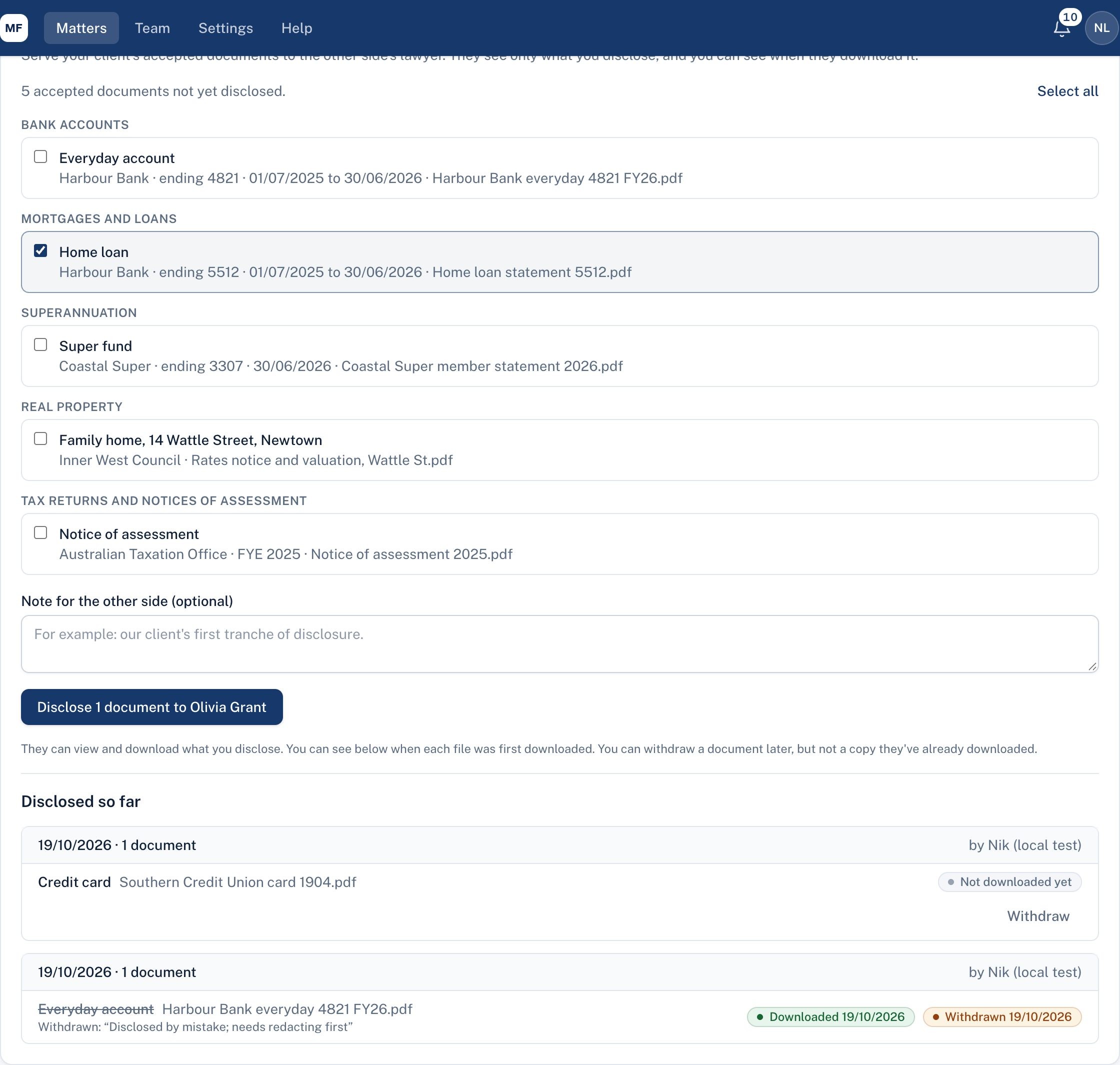
- Open the matter's Other side tab.
- Under Disclose to the other side, tick the documents to disclose. Only your client's accepted documents are listed, and anything already disclosed isn't shown again.
- Add a note if you like, for example "Our client's first tranche of disclosure."
- Choose Disclose ... to the other side's lawyer.
They get an email and see the documents under Disclosed to you on their page, where they can download them.
The register
Disclosed so far lists every disclosure: the date, who disclosed it, the documents, and for each file when it was first downloaded (or Not downloaded yet). Each disclosure, download and withdrawal is also recorded in the matter's Activity.
Withdrawing a document
Disclosed the wrong document, or one that needed redacting first? In Disclosed so far, choose Withdraw beside it, give a short reason, and choose Withdraw document.
- It disappears from the other side's page straight away, and they can no longer open or download it.
- If they've already downloaded it, their copy can't be recalled. The screen tells you if they have; ask their lawyer to delete it if needed.
- Nothing is erased: the register shows it crossed out, with Withdrawn and the date, and your reason.
- You can disclose it again later, for example once it's redacted.
Good to know
- The other side sees only what you disclose: never your client's other documents, your notes, your reviews or the balance sheet.
- A document is disclosed once. If your client later sends a new copy, the new file can be disclosed separately.
- You can withdraw a document later, but not a copy they've already downloaded, so check before you send.
- You need to have invited the other side's lawyer first (see Inviting the other side's lawyer).
Didn't answer your question? Ask our team.