Modelling outcomes
Try splits, who keeps what and add-backs, and see the cash adjustment.
On the Balance sheet tab, choose Model outcomes to try different property settlement scenarios. It's part of the Family law module, and only staff can see it.
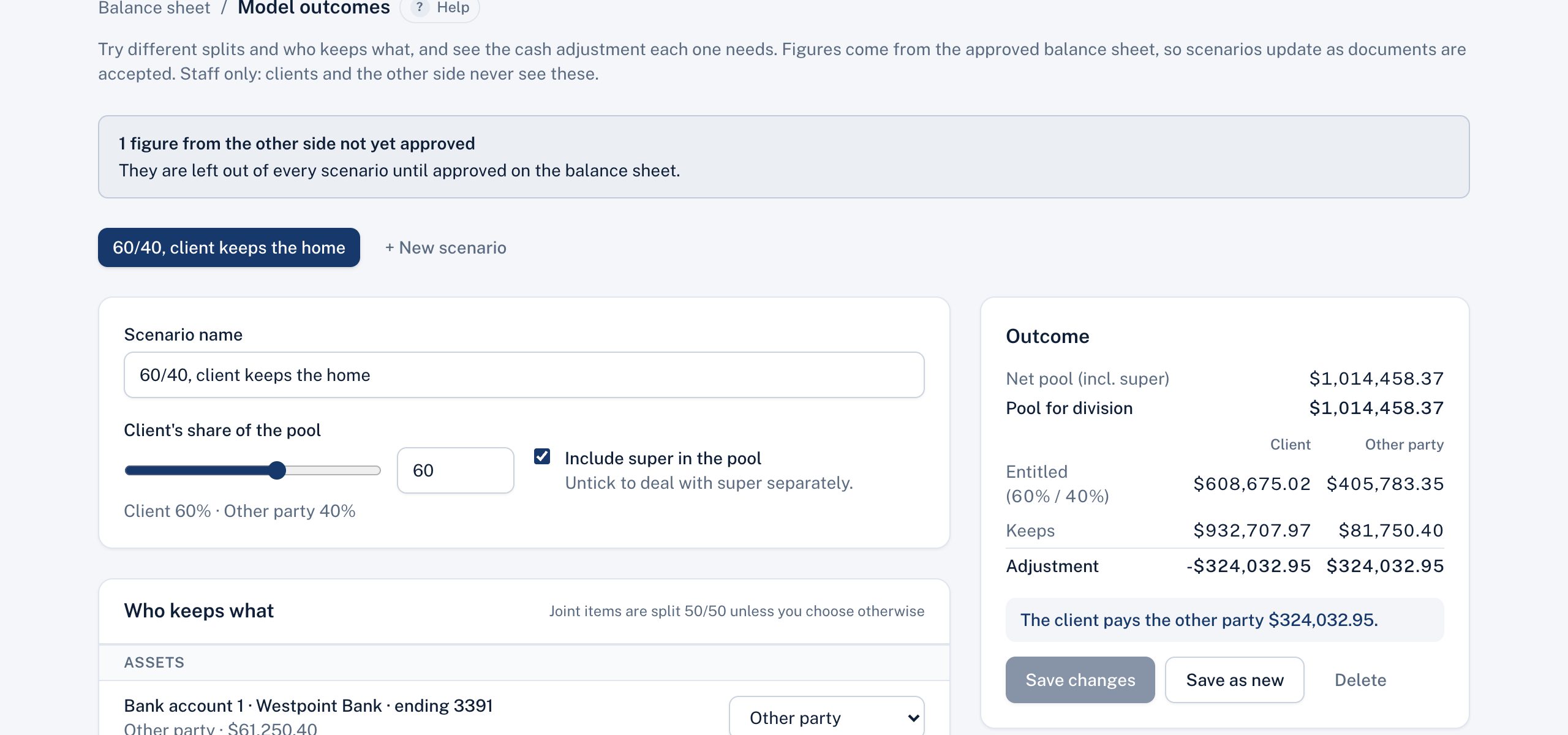
A scenario
- Client's share of the pool: drag the slider or type a percentage, for example 60%. The other party gets the rest.
- Include super in the pool: untick it to deal with super separately.
- Who keeps what: for each asset and debt, choose Client, Other party or Split 50/50. Joint items start as split; items in one person's name start with them.
- Add-backs: notional property added to the pool and treated as already received, for example "Legal fees paid from joint savings, $20,000, received by the other party."
The outcome
The Outcome panel updates as you go:
- the pool for division (the net pool plus any add-backs)
- what each party is entitled to at your chosen split
- what each party keeps under your allocation
- the cash adjustment that closes the gap, for example "The other party pays the client $45,000."
Saving and comparing
Save scenario keeps it on the matter. Save as new copies it, so you can change one thing at a time. With two or more saved, Compare scenarios shows them side by side.
Scenarios store your choices, not the figures. They always use today's approved balance sheet, so they update as documents are accepted. Figures from the other side waiting for review are left out until you approve them.
Every save and delete is recorded in Activity.
Didn't answer your question? Ask our team.