Parenting arrangements
The Parenting tab on a matter helps you work out and compare care arrangements. It's a separate module: if you don't see the tab, ask us to switch it on for your firm. Only staff can see it; clients and the other side never do.
Children, parties and school
Add each child's name, date of birth (their age is worked out for you) and school. Under Parties and school, say who is the mother and father (or parent), add the other party's full name, and choose the state or territory whose school holidays apply. If you leave the state blank, your firm's default state is used (set by a firm admin in Settings, then Parenting). Only staff see any of this.
A proposal
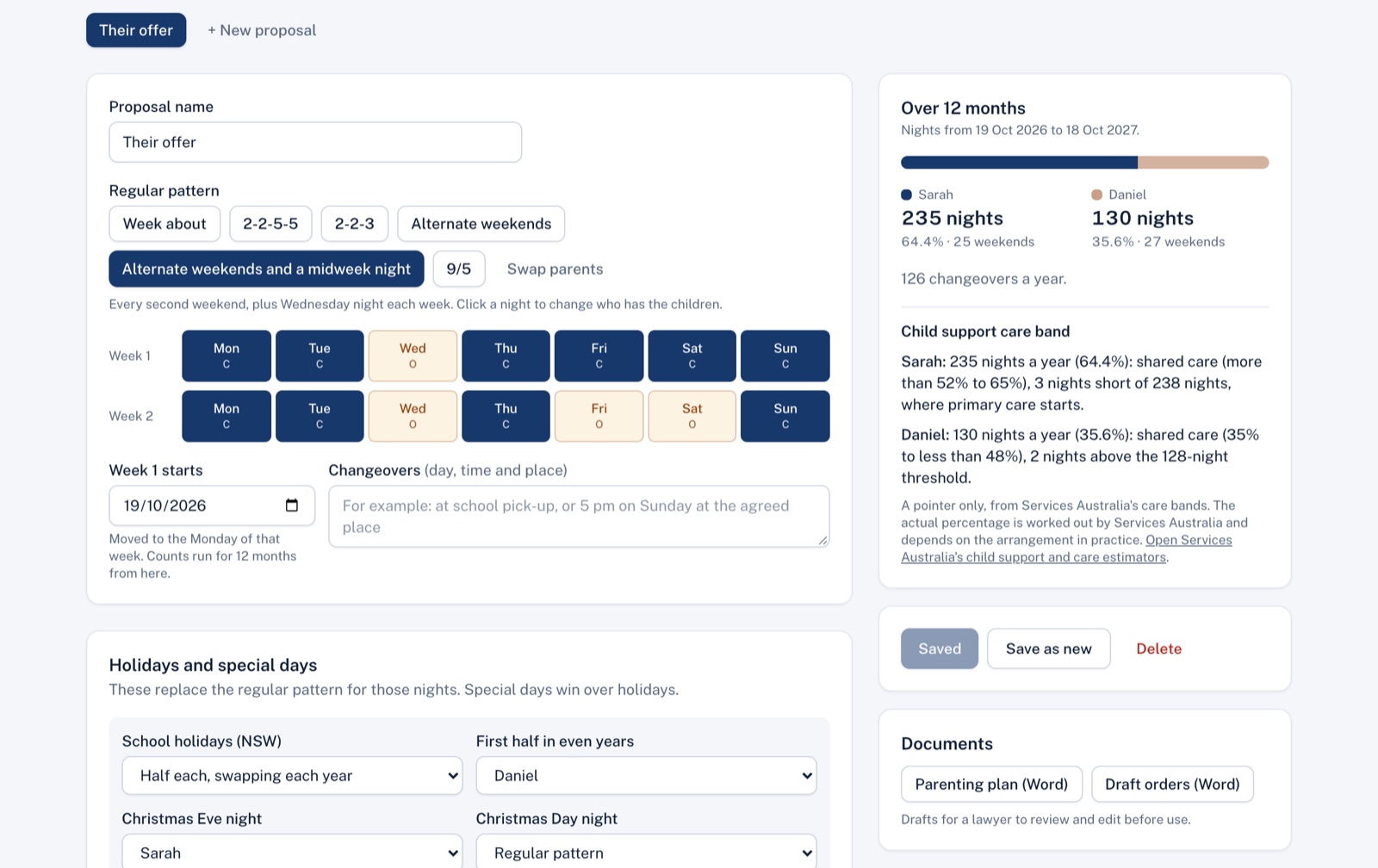
- Regular pattern: choose a common pattern (week about, 2-2-5-5, 2-2-3, alternate weekends, alternate weekends and a midweek night, or 9/5), or click any night in the two-week grid to change who has the children. Swap parents flips the whole pattern.
- Week 1 starts: the Monday the pattern starts from. Counts run for 12 months from that date.
- Changeovers: the day, time and place, in your own words, for example "at school pick-up, or 5 pm on Sundays at the agreed location."
- School holidays: choose Half each, swapping each year (one parent has the first half of every holiday in even years, the other in odd years) or Whole holidays alternate. Holidays run from the night of the last school day to the night before school goes back, using the government school term dates for the state.
- Christmas, Mother's Day and Father's Day: choose who has Christmas Eve and Christmas Day nights, and whether that swaps in odd years. Tick Mother's Day or Father's Day to give the Saturday night before to that parent.
- Your own holiday periods and special days: a period (first and last night) or a single night, such as a birthday or a trip, with the parent who has the children.
Special days win over holidays, and holidays win over the regular pattern.
Each square in the calendar is the night that starts that evening. Green dots mark holiday nights and red dots mark special days.
The summary
For the 12 months, you see each parent's nights and percentage, weekends (Friday and Saturday nights together), and how many changeovers there are.
Child support care band
Beside each parent's nights, the summary shows the Services Australia care band it falls in (for example "112 nights a year (30.7%): regular care"), and says when the count is close to a threshold such as 128 nights (35%), where shared care starts.
This is a pointer only. It gives no dollar figures; Services Australia decides the actual percentage of care, based on what happens in practice. The link opens Services Australia's online estimators: the care estimator works out the percentage of care, and the child support estimator works out payments.
Saving and comparing
Save proposal keeps it on the matter; Save as new makes a copy to change. Save a few (for example "Our proposal", "Their offer" and "Compromise") and Compare proposals shows nights, weekends, holiday nights, changeovers and the care band side by side.
Cost
Parenting arrangements are currently free on every plan. If your plan ever includes a charge for it, the screen shows the cost under the save button and asks you to confirm before the first proposal on a matter is saved. See Plan and billing.
Every save and delete is recorded in Activity. Proposals are a planning aid, not legal or child support advice.
Didn't answer your question? Ask our team.